00. Start
"Just a Wrapper" Is Harder Than It Sounds
This is a vibe-coding field-notes series — a record of what broke, what I traded off, and what I learned while porting a coding agent's capabilities into a vertical writing product.
🪧 Let's Start with an Offhand Comment at Dinner
Last month I had dinner with an old friend I hadn't seen in a while. He asked what I'd been up to. I told him I was building an AI writing assistant — one that learns your style and gets better the more you use it. He gave a noncommittal "huh," then asked, almost as an afterthought: "So, is this just a wrapper?"
I froze. Not because I was offended — I hadn't actually started building yet, and honestly, I couldn't have explained the difference myself.
My original plan was about as simple as it gets: the model has an API, so stuff the writing requirements into a prompt, catch what comes back, and render it on screen. Done. At one point I genuinely believed the hard part would be the frontend polish and how well I tuned the prompt.
It wasn't until I actually got into it that I realized how badly I'd underestimated everything hiding behind that word "wrapper." I've spent the last month up to my neck in it, so this seemed like a good time to write a prologue and actually unpack that slightly dismissive little jab.
🔩 Same Model, So Why Can It Work on Its Own — and Mine Can't?
Let's start with Claude Code.
If you've used it, you know the feeling: tell it in the terminal "finish the tests for this module," and it goes off and reads the code, works out the structure, edits files, runs the tests, reads the failures, fixes them, and keeps going until the tests are green — mostly without you stepping in. It behaves like a coworker who actually gets things done, not a chatbot that just talks back.
Here's the strange part: I took that exact same Claude model and called the raw API myself, and I couldn't reproduce that feeling no matter what I tried. A demo built straight on the API can do exactly one thing — send a message, get a message back. Even with today's smart models, it still feels trapped inside a chat box: it can't touch my files, and it doesn't remember what it just did.
And that's the actual point: the gap isn't the model. It's everything wrapped around it.
Here's an analogy I like: the same engine, bolted into a roadworthy car versus sitting on the ground idling, are two completely different things. What turns an engine into a car is the whole control system around it — transmission, drivetrain, steering wheel, brakes, dashboard. The model is the engine: smart, powerful, but it doesn't know the way, can't brake, and can't even reach the steering wheel.
What makes Claude Code impressive is exactly how solid that control system is. It has a self-driving loop that lets the model take many steps in a row. A set of tools that let it actually read and write files. A permission layer that stops it from wiping your disk. Plus memory, compaction, delegation. Add it all up, and that's what gets you to "working on its own."
The industry has a word for all of this: the harness. And the moment you shift your attention from "how strong is the model" to "how is the harness built," things stop being abstract and start being something you can actually reason about and control.
🧭 Boiled Down to a Formula
If my friend asked me that question again today, here's roughly how I'd answer:
Yes, it's a wrapper. But that wrapper has real engineering in it, and it's a critical part of building a good product.
Or, more bluntly, as a formula:
An AI agent product ≠ a large model + a prompt. It = a model (the engine) + a whole harness around it.
"Just a wrapper" invites dismissal because it pictures that layer as a sticker, a thin coat of paint. But once you actually build it, you find out that layer is an entire drivetrain and control system. No matter how capable the model is, without a harness underneath it, it just idles in place.
That's the thread this series pulls on: taking Claude Code's well-regarded harness apart, layer by layer, and working out how to rebuild each one for a writing context.
🛠 Why I'm Doing This
Quick bit of background first. The product I'm building is called SmartWriter. In one sentence:
A local writing agent that runs on your machine. It learns your style, gets better the more you use it, and helps turn what's in your head into a finished piece — faster, and closer to how you'd actually write it.
I can't stand what people call "AI voice," so this thing is explicitly not positioned as "write it for you" — it's "help you turn what's already in your head into a finished piece, faster and with less friction." A few things I cared about specifically: it has to actually learn your style — the words you reach for, how you build an argument, what you'd never say. It has to remember you, getting sharper article after article. And it has to let you interrupt and redirect at any point, instead of disappearing and coming back with a wall of text you never asked for.
That's actually a demanding bar to clear: don't build another generic chat agent in disguise — port Claude Code's coding-agent capabilities, wholesale, into a writing context.
The word "port" alone is a warning sign — this was never going to be as light as "just swap the prompt." And sure enough, it wasn't: almost every layer needed to be re-cut from scratch. A lot of detail to work through, but pushing through it turned out to be worth a lot in hindsight.
✍️ What Does Writing Actually Demand from an Agent That Coding Doesn't?
I touched on a few of these earlier — worth expanding on. Where do the expectations for an agent actually diverge between writing code and writing prose?
- It has to have warmth, not just "execute." Code wants accuracy and reproducibility — a cold, clinical tone doesn't cost you anything, efficiency matters more. Writing is the opposite. What I care about is whether it sounds human. A sentence that's technically correct but has no human warmth to it is a failure in writing, full stop. So it can't behave like an engineer just closing out a ticket.
- It has to be interruptible, mid-task. Coding tasks usually have a clear target, and running straight through to the end is ideal. Writing is a process of second-guessing yourself — you're halfway through a paragraph and suddenly the tone feels too sharp, or that example should be a different one. So the agent can't be "you talk, I write straight through to the end." It needs to be the kind of collaborator you can stop at any moment, and who can wander off-script with you mid-thought.
- It has to protect the author's voice, not just say whatever comes to mind. This one's subtle. When you ask it to complete or refactor code, thinking outside the box is usually a good thing. Writing is the opposite — the job is to help you say what you already meant to say, better, not to hand you what it wanted to say instead. More than once the model handed me back a whole paragraph of quotable one-liners — genuinely well-written — that just didn't sound like anything I'd say. All I could do was cut it.
- It has to actually remember you, not treat every session like a first date. A coding tool is something you use and walk away from — problem solved, done. A writing assistant's value compounds over time: it needs to remember the tone of your last piece, the habits you've corrected it on more than once, the things you've explicitly ruled out — building up a profile of you, article by article, that gets sharper each time.
- It has to tell "source material" apart from "instructions." A reference document you hand it, a draft you paste in — that's material, something to consult or work from. What you type into the input box is the instruction for what to do this time. In coding this line doesn't matter much, but in writing, blurring it is dangerous: paste in a sample article for reference, and the agent might read it as "write like this," and your voice quietly drifts.
Looking at these five, a coding agent's default habits don't transfer as-is. Which means the harness underneath can't just be copied over either — it has to be re-customized for writing, layer by layer.
A concrete example: Claude Code hands the model a master key — the ability to run arbitrary shell commands. For coding, that's completely normal: run scripts, install dependencies, run tests. In a writing context, though, that key isn't just unnecessary — copying it over blindly would be a mistake. What does a writing agent need a general-purpose shell for? Keeping it around is just leaving your biggest security backdoor wide open. This kind of case-by-case judgment call shows up constantly while building the product, and I'll keep circling back to examples like it throughout the series.
🗺 Taking the Harness Apart: A Map
So which layers actually need to change? I broke it down into 6 sections and 12 core mechanisms, plus 2 verticals covering how it all gets embedded into an actual product — and tried to string what looks like a pile of scattered parts into one causal chain, each link depending on the last:
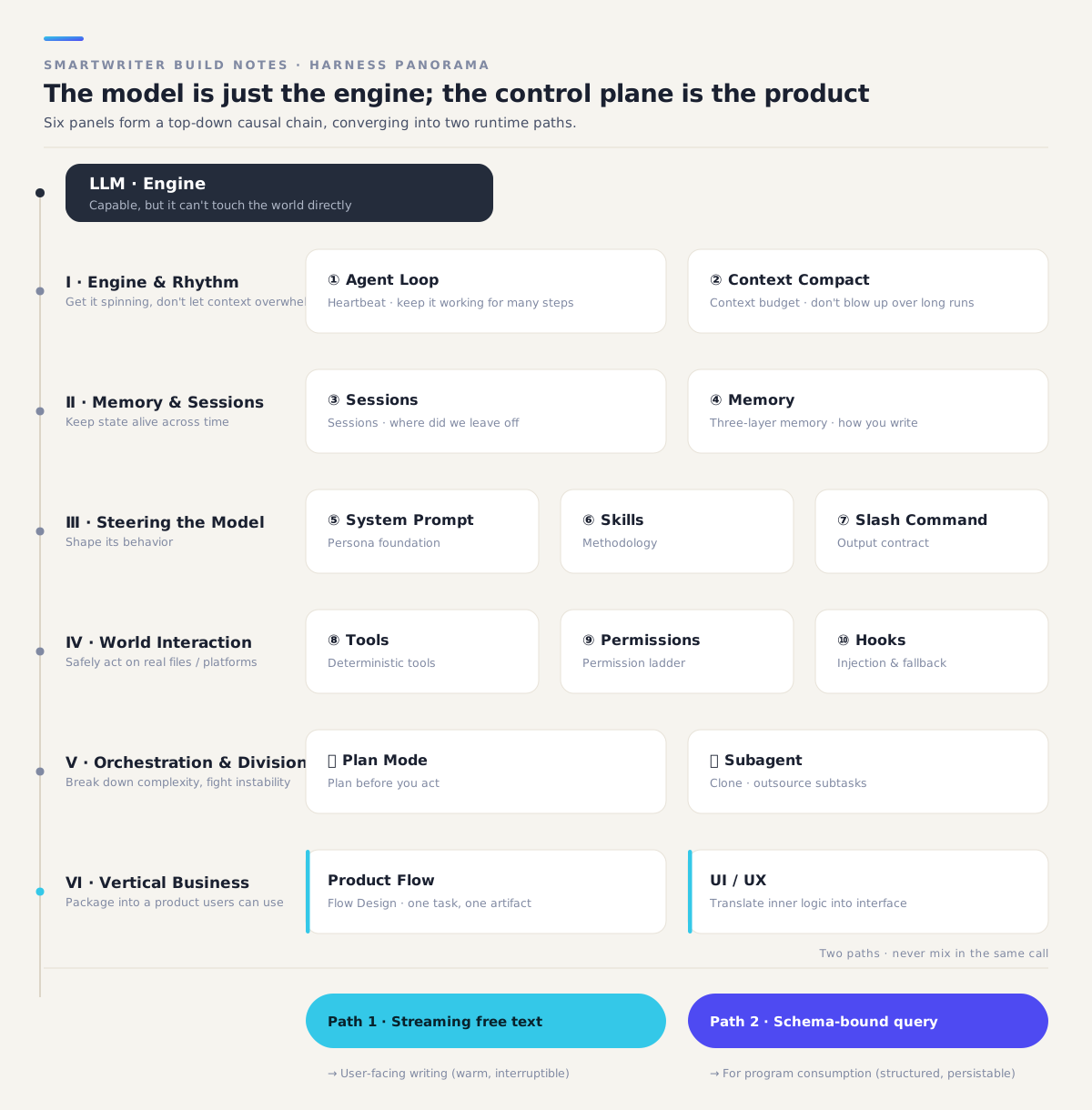
Here's how I think about that chain — each link is a precondition for the next:
- First, a self-driving engine (Loop) — and one that doesn't blow past a finite context window the longer it runs (Compact).
- Spinning isn't enough on its own — it has to remember things across time: where this piece is right now (Session), and how you, specifically, write (Memory).
- Once it can remember, I need to be able to shape its behavior: give it a writing persona (System Prompt), give it a methodology for "how to write this kind of piece well" (Skills), give the user a clear contract for what each command does (Command).
- Behavior also has to land safely in the real world: hand deterministic work off to tools (Tools), fence it in with permissions so it can't touch what it shouldn't (Permissions), and inject my own logic as a backstop at the critical points (Hooks).
- For anything long and complex, it has to know how to break the work down and delegate: plan before acting (Plan Mode), and outsource research and quality checks to a "clone" of itself (Subagent).
- Finally, all of this has to get packaged into a product that a writer with zero interest in agent jargon can just pick up and use (product flow + UI/UX).
This map is the skeleton for every post that follows. There's a lot to cover, and I've trimmed as hard as I could — the posts are still long. So every post opens with a "you are here" marker, in hopes of keeping both the zoomed-in detail and the big picture legible at the same time.
🔀 Two Threads That Run Through Everything
One design principle shapes basically everything that follows, so let me plant it here early: in SmartWriter, every output ends up on one of two sharply separated paths.
- Path one is for humans: the prose you watch the agent write, character by character, on screen. It's free-form, streamed, has warmth to it, and has to be interruptible at any point.
- Path two is for code: things like "what style preference does this edit reveal" or "what issues did this quality check turn up." These conclusions get consumed by backend code, so they have to be structured, validatable, and something you can write to a database.
Take a concrete case: you keep editing and polishing an AI-generated draft. The backend now has to track two things at once. One: preserve, display, and archive your edited text exactly as you left it — that's for you, and not a character of it can be altered. Two: figure out what style preference your latest edit reveals, and whether it's worth writing into your profile — that's for the program, and it has to be judged and stored in a structured way. Same action, two completely different outputs: one wants raw, unmodified free text, the other wants machine-consumable structure. Force both into a single model call — writing prose and emitting JSON at the same time — and it does neither one well.
Keep the two paths out of the same call, and they each do their job without stepping on each other. This shapes real product decisions — why the writing itself never gets forced into a schema, why analyzing your style happens asynchronously, outside the writing flow — and every one of those answers traces back to this split.
📕 What This Series Is, and Isn't
There's no shortage of good material on agents already. Before I started building, I went through these three repeatedly. This series stands on their shoulders — think of it as field notes from actually building the thing:
| If you want to understand | Go read | What this series adds |
|---|---|---|
| The principles and thinking behind agents | Claude Code Harness Book | Grounding the abstract principles in the tradeoffs of a real product |
| How Claude Code is implemented internally | Learn Claude Code (source walkthrough) | Not a retelling of the source — how to use it through the SDK's abstraction, and how I rebuilt it |
| What the SDK gives you out of the box, and how to call it | Claude Agent SDK official docs | What's missing from the docs: where the gotchas are, why the defaults fall short, how to customize for a vertical use case |
Call it less "teaching you how to build an agent" and more an honest record of where my understanding currently stands, plus the detours and mistakes from actually building this. Some of what I say with confidence here might age poorly as my own thinking evolves — but every mistake in here, I actually made.
In one line: this series is the field-experience layer on top of those three, plus a worked example of a real vertical product. Read the official docs, and you'll know what the SDK can do. What I'm adding here is what happens when you actually build a real product with it, and how those decisions got made.
And upfront, what this isn't, so I don't waste your time: no step-by-step environment setup, no line-by-line code walkthroughs — the SDK's own docs and examples do that better. No re-translating the API reference either; that's the official docs' job, not mine to steal. I'll try to avoid padding this with "agents are genuinely powerful" filler that's technically true and says nothing. Every post carries at least one first-hand "here's where I got burned" and one "here's why I chose this" judgment call. The diagrams are mostly architecture and flow charts doing the structural heavy lifting; code only shows up where a sentence can't explain it but a few lines instantly can.
One example, early on: not long after starting, I hadn't made up my mind yet, so I just lifted Claude Code's stock system prompt wholesale — standing on giants' shoulders, why not? But after actually reading the fine print and testing it, the software-engineering instructions baked underneath kept leaking through, and the output read stiff and mechanical. Ended up tearing it down and building a writing-specific one from scratch. Expect more of these — "didn't understand it yet, tried to take a shortcut, paid for it later" — scattered through the rest of the series, at the right moments.
Next up, we start at the very bottom of this machine. The loop that lets an agent work on its own turns out to be exactly where those two paths fork — one toward free-form text for humans, the other toward structured data for code. Which raises a small, interesting question along the way: when you ask it one thing, how many round-trips does it actually run internally? And why can't that number just be shown to the user as "turn N of the conversation"?