Close the Window, Pick Up Where You Left Off: One Writing Task = One Session
The last two posts took the engine apart: a self-driving heartbeat (Loop), plus compaction (Compact) to keep it from blowing out its context window the longer it runs. Both were scoped to "inside one writing session." This post zooms out: you're halfway through a piece today, you close the window, how do you pick it back up tomorrow? And if you've got three or four writing tasks open at once, how do they stay separate instead of bleeding into each other? The answer centers on Session.
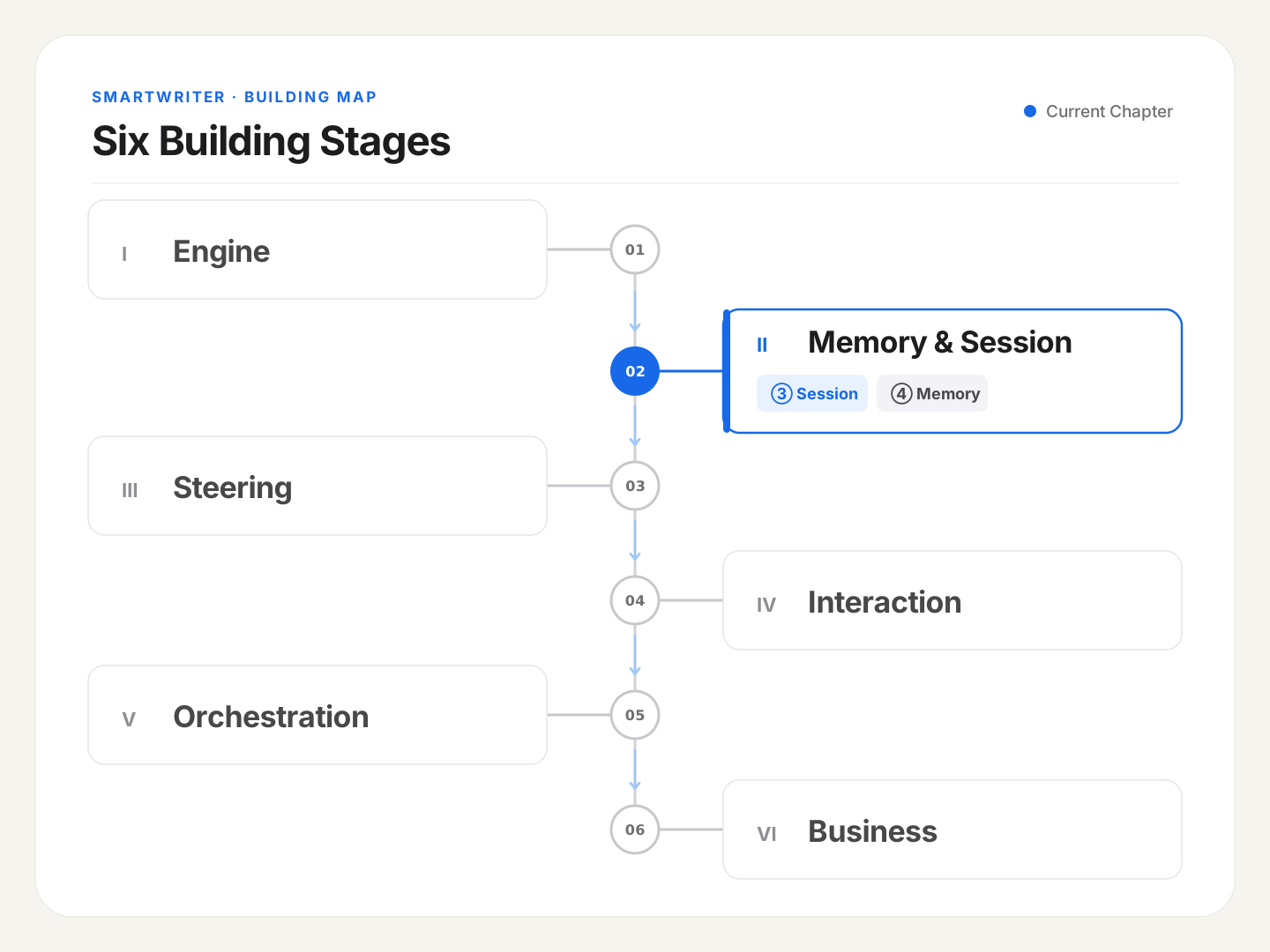
👆 You are here
🪧 Multiple Tasks, One Switch, and Everything Was Gone
Ran into this one while trying to squeeze in a few extra articles before a weekly usage quota reset — didn't want to waste it.
The SDK supports resume, which can pull a past session back up by its session ID. In theory, SmartWriter should support running multiple tasks in parallel by design — as long as you stay under the model's rate limits (which normal writing almost certainly does), running several articles at once shouldn't be a problem.
So I confidently kicked off several writing tasks at once — and immediately hit a wall. Switch away from a session that was working just fine, switch back, and there's nothing there. Not only did I fail to make good use of that quota, I'd also uncovered a real hole that needed fixing.
This post uses that as the jumping-off point to work through what a session actually is, how it's stored, and how it gets restored. It's also the first step toward understanding how a writing product remembers you across time.
🧭 The Core Idea: A Session Is "One History," Not "One Project"
Two concepts that are extremely easy to blur together first need separating: session and collection (project).
A session is one conversation history. Concretely, in SmartWriter, it's the complete record of "this one writing task, from creation to finished draft, every back-and-forth in between." You ask it for an outline, it produces one; you say the second paragraph is too flat, it rewrites it — that entire back-and-forth, start to finish, is one session. It has a few defining traits: it's one-off (tied to one specific writing task), it gets compacted (that's last post's Compact), and it can be resumed (picked back up across days, across windows). Technically, it's persisted as a .jsonl file — think of it as a conversation log, one message per line.
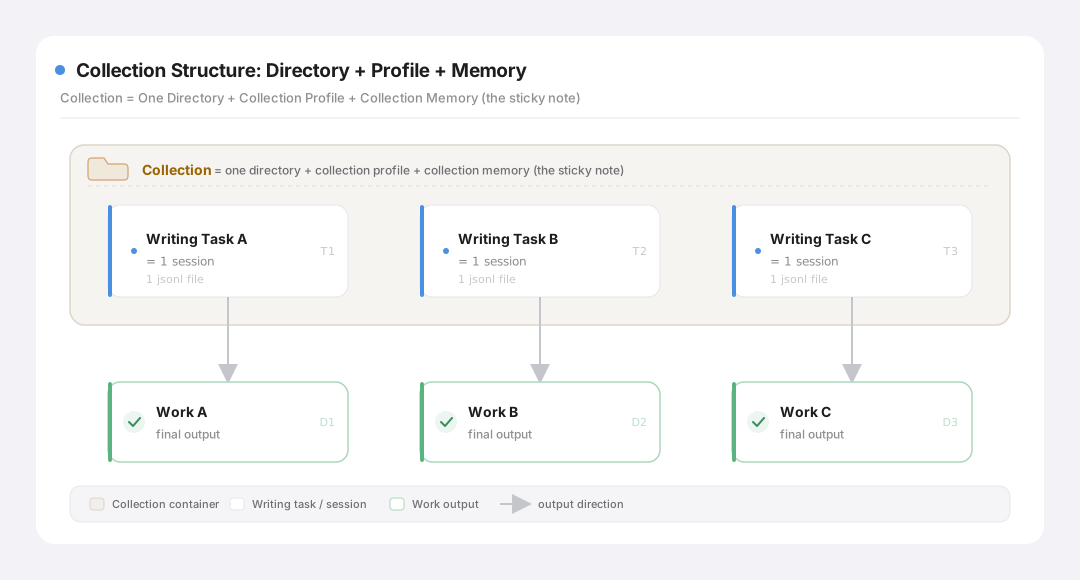
A collection, on the other hand, is a container holding several sessions. Say you're writing a ten-part series — those ten pieces make up one "collection." Each piece written inside that collection is its own writing task — its own, independent session.
Here's an analogy: a session is one notebook currently being written in; a collection is a drawer holding several notebooks. The drawer itself isn't a notebook — it's a place to keep things organized, and it also holds a sticky note recording the shared tone and the index of pieces already written for that series. This distinction matters, because it decides what a "collection" should technically be built as: a directory plus a handful of memory files — not "one enormous session."
Collection structure
Worth clarifying one more, orthogonal concept while we're here — CLAUDE.md, which kept showing up in the last post. It and session are complementary opposites: a session is this piece's "dynamic history" (one-off, gets compacted, archived once it's done); CLAUDE.md is the "static, standing rules" that span every session (re-injected on every request, immune to compaction). One tracks "what got discussed this time"; the other tracks "the rules every session has to follow."
🔩 How Claude Code Does It: One Project, Many Independent Sessions
This hierarchy — session inside project — is borrowed directly from how Claude Code does it. Understanding its approach gives us a reference frame.
When you use Claude Code, the same code repository (one project directory) can host many independent conversations over time: one today to fix a bug, another tomorrow to add a feature. Each of these conversations has its own independent history (its own .jsonl), and they don't interfere with each other. But they share two things: the project's CLAUDE.md (project rules), and the same set of code files.
So Claude Code's architecture works like this: the "project" is the shared foundation (rules + files); "sessions" are each independent record of work done. Sessions don't share a history with each other, but they stand on the same foundation. SmartWriter's "collections and tasks" is basically this same relationship, carried over: the collection is that shared foundation, and each writing task is one independent session. A lot of the design detail here traces directly back to Claude Code's project model, adapted for a writing context.
🛠 What the SDK Gives You: One Storage Location, and Three Ways to "Go Back in Time"
The Claude Agent SDK packages "how a session gets stored and restored" into a few clearly defined capabilities.
Storage, first
The SDK's docs are explicit: out of the box, a session lands at ~/.claude/projects/<encoded-working-directory-name>/<session-id>.jsonl — that path is essentially fixed, not something you get to choose. That said, the SDK leaves a small, easy-to-miss door open for mirroring that history to a location of your own; how and when that's actually necessary is a real gotcha I'll walk through below.
Restoring, next
This is the important part. The SDK gives you three ways to "go back in time":
Mode
How you use it
In one line
Typical use case
continue
No ID needed — picks up the most recent session in the current directory
"Keep going where we just left off"
One task, just closed it, want to keep writing
resume
Pass a specific session ID, restore exactly that one
"Flip to a specific notebook and keep going"
Several tasks running in parallel, need to name which one
fork
Copy a point in history off to the side, leave the original untouched
"Photocopy this notebook, experiment on the copy"
Want to try a different direction without risking the current version
Beyond restoring, the SDK also gives you list_sessions (list every session), rename_session, and tag_session — plenty to build a "task list / draft history viewer" on top of.
⚠️ Gotcha: when you resume, the working directory (cwd) has to be identical to when the session was created. The SDK finds that history on disk using "encoded working directory + session ID" — change the directory, and it looks in the wrong place, silently hands you a brand-new empty session, and you think you resumed successfully when there's actually nothing there.
🧩 What SmartWriter Does: Mostly resume, fork Not Yet Wired Up
The three capabilities are already flexible enough — the real work on the app side is binding them to what "writing is long-running, iterative revision" actually needs.
Mainly resume: solving parallel writing first
The simplest possible tool could be "single session": close it, reopen it, pick up the most recent one — continue is the least effort. But in my own experience, an article rarely gets written in one sitting; it goes through repeated rounds of polishing, and it's common to come back to it after it's had time to settle. Which means I'm often running multiple tasks at once — an essay, a product-tech piece, a routine weekly update, all moving forward in parallel. In that situation, continue's "pick up the most recent one" isn't enough — you need to name exactly which one you're resuming.
SmartWriter's current version leans on resume for this. Implementing it isn't complicated — the app side just needs to remember each task's session ID. Concretely: every time a task finishes running, the SDK returns a session_id in its final message; that ID gets stored in the task's metadata, and the next time you want to resume it, you resume using that ID.
Putting fork to good use: writing's "undo insurance"
The frontend hasn't wired up fork yet, but personally I think it's an important tool specifically for writing, and it's on the list for Phase 2. Coding is mostly about moving forward. Writing sometimes needs to explore sideways: first person or third person for this section? Open with the conclusion, or with a story? These forks feel worth trying — but trying them also comes with the fear of "wrecking the version I just spent an hour getting right."
fork gives you the confidence to actually try: it copies a parallel draft off the current history, so you can experiment freely on the copy while the original sits untouched. If the experiment works out, adopt the copy. If it flops, switch back to the original — not a single word lost.
Collections aren't one giant session — continuity comes from feeding memory, not from resume
Picking up a thread from earlier: why design a themed collection as "a directory plus memory files," rather than "one long session running through the whole series"?
Flip it around for a second — "a ten-part series sharing one long conversation would naturally remember the whole series, wouldn't it?" Seems plausible in theory. But two problems make it unworkable in practice. First, that conversation would grow endlessly long, repeatedly triggering compaction — and the detail from the first few pieces would already be gone (Compact strikes again). Second, with ten pieces' worth of history tangled into one session, there's no clean way to "name" and resume just the third piece to edit it on its own.
So this is really a tradeoff about where session boundaries sit: continuity across tasks doesn't come from session resume — it comes from feeding the collection's shared memory in as context to every new session. Concretely: the collection directory holds a "collection profile" and "collection memory" (that series' tone, its arguments, an index of pieces already written), and every time you start a new piece (a new session), that memory gets injected in. That keeps every piece's session clean and independently resumable, while "series consistency" is guaranteed by that shared memory — not hung on one fragile, ever-growing session.
What was actually going on with that "switch tasks, lose everything" bug
This one was a real headache, and it took a while to untangle — it turned out to be several coupled bugs across frontend and backend: the frontend wasn't remembering the taskID on switch, so the SSE stream couldn't reattach; switching tasks was also calling an abort fetch that accidentally killed the backend process; and on top of both of those, streaming mode doesn't automatically persist the in-memory session detail to disk. That last one is the one directly relevant to this post — even though the app side was correctly remembering the session ID for the task, it didn't matter if the session history itself never made it to disk.
🔧 Gotcha · streaming mode never writes the session to disk at all (architectural)
Symptom: switch away, switch back, load_history returns an empty array, the frontend shows nothing. Go look under ~/.claude/projects/ — no file. Search the whole machine for the session ID — nothing.
Root cause: SmartWriter's writing flow runs on the SDK's streaming input mode (so you get real-time typing and can interrupt at any point). Under the hood, the CLI process has an easy-to-miss behavior in this mode: it never persists session history to disk — it only lives in that process's own memory. So "keep talking across turns" works fine (same process, memory's still there); but the moment that process gets killed (which, in this case, coincided with the frontend's abort-fetch bug), the in-memory history dies with it. The storage path the SDK docs describe only applies to the traditional, non-streaming mode — streaming mode never writes there in the first place.
Fix: give the SDK a session_store. I built my own FileSessionStore, which mirrors what would otherwise be memory-only session history out to disk in the workspace. That way, even if the process dies, the history is still on disk, and it can be read back in when you switch back.
📐 Going deeper · how FileSessionStore bridges an in-memory session to disk
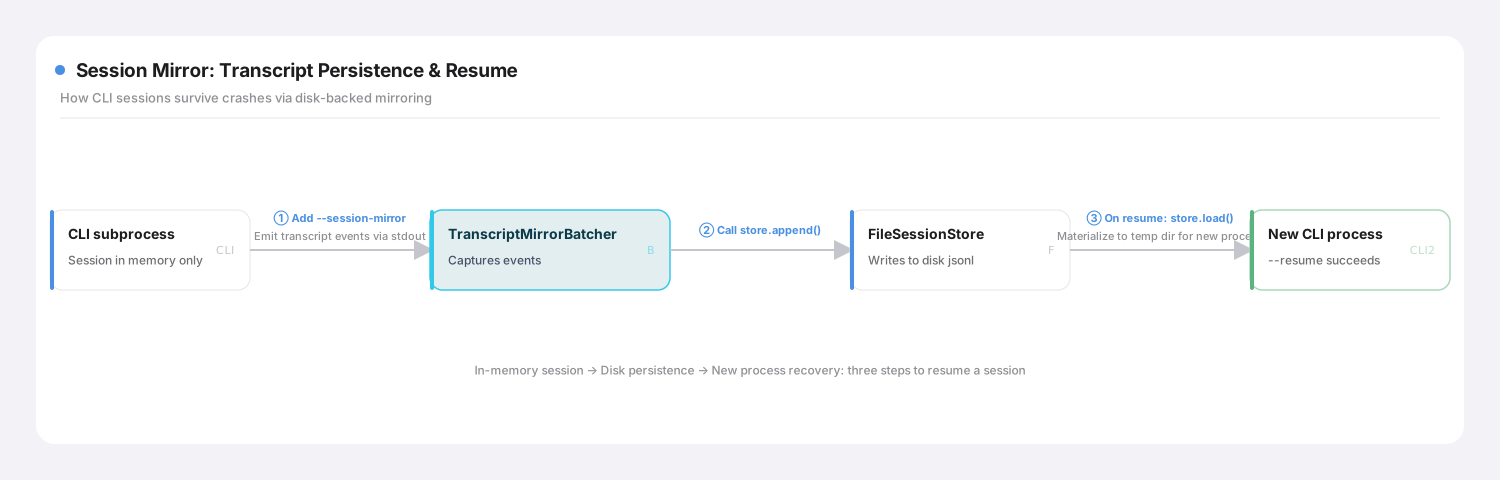
Once you set session_store on ClaudeAgentOptions, the SDK automatically chains together three steps that mirror "a session living only in the CLI's memory" into "a file on disk you can resume from":
Checkpoint-and-resume mechanism
Broken down: ① the SDK automatically adds a --session-mirror flag to the CLI, which keeps running in memory as before while also "broadcasting" every session event over standard output; ② a batcher called TranscriptMirrorBatcher catches those events and calls the store.append() I implemented, to persist them; ③ when fork/resume runs, the SDK calls store.load() to read the history back, materializes it into a temporary directory, and lets a fresh CLI process resume from there.
My FileSessionStore writes this history to a controlled location inside the workspace: .smartwriter/sessions/<project-key>/<session-id>.jsonl, sitting physically alongside the rest of that user's workspace data — it enables resume, and doubles as a complete evolution history of the draft.
The core idea: streaming mode trades "on-disk persistence" for "real-time responsiveness," and session_store is the thread the SDK leaves hanging for you to reconnect that real-time session back to the persistent world.fork/resume depend on it entirely.
⚖️ Wrapping Up: "Use It and Walk Away" vs. "Come Back Again and Again" — Sessions Carry Very Different Weight
This post covered a lot of technical ground, but the throughline is clear: writing places a genuinely strong requirement on session persistence. A session isn't disposable — something you finish with and never think about again, where next time's conversation is next time's problem. In a writing product, it's an asset you'll come back to again and again, keep polishing, and need every version of preserved:
⚖️ The tradeoff · is a session "use it and walk away," or "come back to it repeatedly"?
The "lazy" default
What SmartWriter does
Why
How to resume
Mostly continue — picking up the most recent one is enough
Mainly resume, naming a session precisely by ID
Writing runs multiple tasks in parallel — they need to stay cleanly separate
Experimenting
Start a new conversation if you're not happy with it
fork a parallel draft, keep the original intact
Writing needs to explore sideways repeatedly, and no version can be lost
Session persistence
Use the default, rarely take it over yourself
Built a custom FileSessionStore to catch what streaming mode never persists
Sessions span days and windows — losing one means losing real work
Continuity across tasks
Basically none
Feed collection memory into each new session, don't hang it on one long session
Series consistency has to be solid, but each piece still needs to resume independently
So: a single writing task's history now reliably survives a shutdown, and can (in theory — not yet implemented) branch off to experiment. But notice something: everything we've solved so far is memory for "this one task." No matter how well a session resumes, it only ever holds "what got discussed in this one piece." SmartWriter's whole pitch is "gets better the more you write" — and that runs on a different kind of memory entirely: memory that spans session after session and remembers you — the words you reach for, what you'd never write, the tone you consistently prefer.
How many layers does that cross-session memory break into, what lives where, who's allowed to write to it, and how do you keep it from getting polluted? That's the subject of the next post, Memory — and honestly, the one I think best captures what "the soul of a vertical product" actually means. Let's keep going.