08. Tools
Don't Let the Model Talk Its Way Through It: Custom Tools, MCP, and the Boundary of Determinism
The "Steering" section nailed down what the agent wants to do and how it thinks about doing it — but all of that has stayed inside the model's head so far. Actually landing that thinking on a real file — or even pushing it out to an external platform — runs on tools. This post covers how I equipped this writing copilot with tools, and the underlying question of where the boundary sits: build it myself, or plug into an external MCP/CLI?
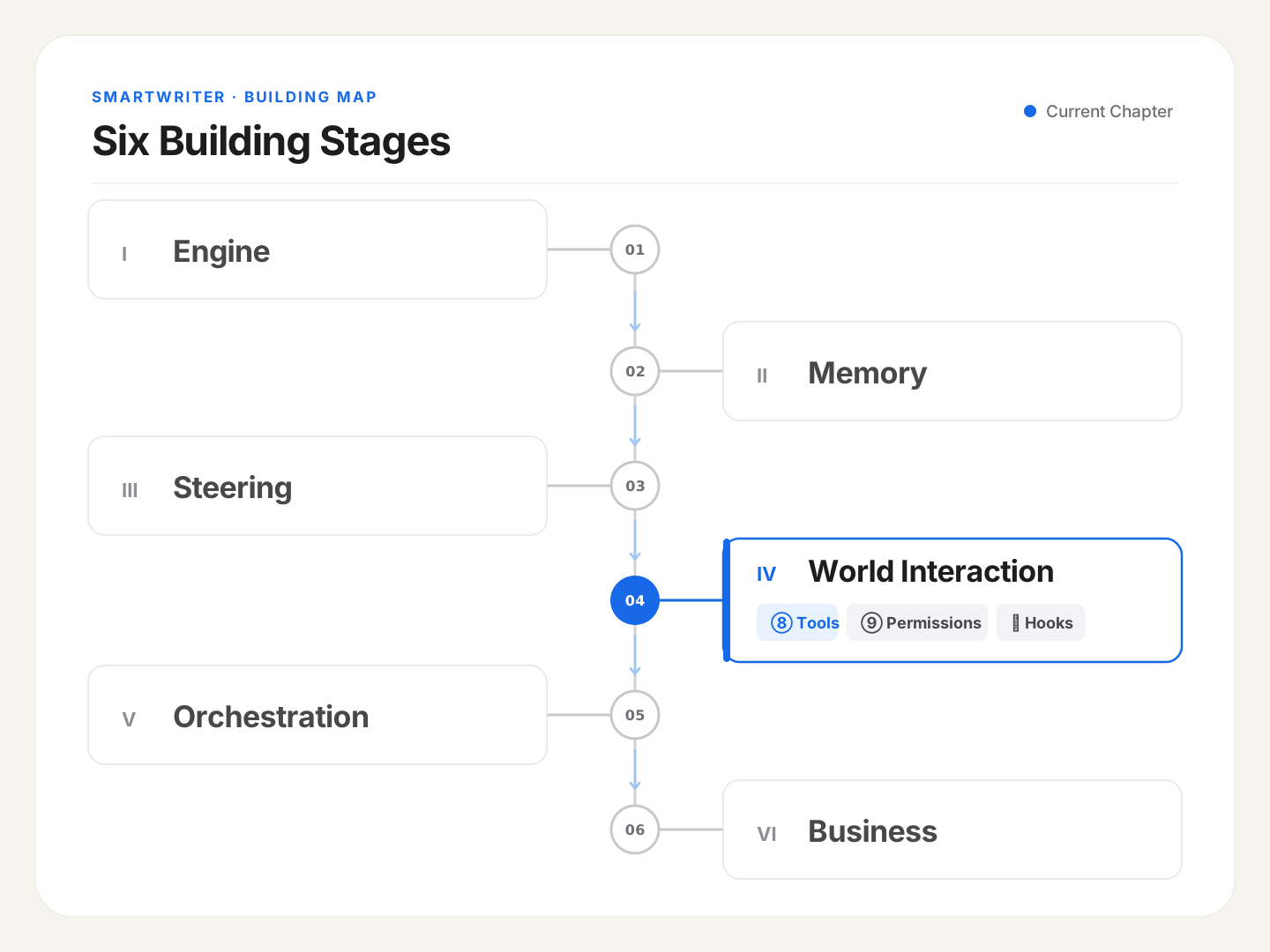
🪧 A Judgment Call That Keeps Coming Up: Should the Model Do This, or Should It Be a Tool?
Markdown formatting is something everyone's familiar with. I run into it almost daily, and it's a recurring annoyance: move a passage between different products, and its formatting drifts — heading levels get scrambled, a list loses its leading blank line, or it just stops matching the surrounding format. My usual move here has been to just ask the model: "clean up the Markdown formatting on this piece." It can do it, and it gets it right most of the time.
But when I'm actually building a product, I stop and think twice: this is really the model "talking" its way through work — using language understanding to guess what needs changing, then re-typing the whole thing out, character by character. Slow, expensive in tokens, and occasionally it slips and changes something it shouldn't have. But this task is fundamentally deterministic: what counts as valid Markdown has clear, explicit rules — a few dozen lines of code can nail it precisely, with zero need for "understanding" of any kind.
Follow that logic forward, and the principle for equipping an agent with tools falls out naturally:
Anything deterministic and programmable shouldn't be left to the model to "talk" through — build it as a tool instead.
This principle is really a continuation of the "deterministic takeover" thread from the last few posts. Post 6, I took over "which genre to use." Post 7, I took over "how a command actually triggers." This post, I take over execution itself, away from the model's mouth. Let's dig into how that takeover actually works, and how far it goes.
🧭 The Core Idea: A Tool Is Deterministic Work, Taken Away from the Model's Mouth
First, the word "tool" itself.
In an agent's context, a tool is a piece of deterministic code. The model's role shifts: it no longer does the work itself by "talking" — it's only responsible for deciding "it's time to call this tool." The actual execution belongs to that code. The model makes the call; the code does the work. Each stays in its lane.
Dig one level deeper: the model itself can't run any code at all. The only thing it can actually do is emit, in its own output, something like "I want to call tool X, with these parameters" (this came up back in post 1, on Loop — that's a tool_use). What actually runs that code is the harness sitting around the model; once it's done, the harness feeds the result back in, so the model can keep thinking from there. So "giving the model a tool" really means registering one more callable capability into that "model requests → harness executes → result fed back" loop. The model names it; the harness executes it. That division of labor is the underlying logic behind every tool call, whether it's a built-in read/write tool or one I wrote myself — all of it runs on this same mechanism.
Why split it up this way? Three reasons: accuracy, cost, stability. Accuracy — code doesn't miscount, but the model "talking" its way through a word count can be off by dozens. Cost — a piece of code barely burns any tokens, while having the model re-type an entire article, word for word, is expensive. Stability — code's behavior is predictable and testable; a model's free-form output is hit or miss. Handing deterministic work to code means saving that precious, dangerous thing called "uncertainty" for where it's actually needed — the writing itself.
🔩 Claude Code: A Toolset, Plus a Discipline for Using It Well
Claude Code is a ready-made teacher here. It's built for coding, but its design thinking crosses domains cleanly. The second post in the Learn Claude Code source-walkthrough series takes Claude Code's tool-usage mechanism apart in detail — worth a read if you're curious.
First, what tools it actually equips the model with — roughly grouped: read and find — Read (read a file), Glob (find files by name pattern), Grep (search by content); act and change — Write (write a file), Edit (edit a file); general execution — Bash (run any system command, essentially a master key); reach outward — WebSearch / WebFetch (search and fetch online); plus delegation with Task (send off a sub-agent) and note-keeping with TodoWrite (manage a to-do list). This toolset basically draws the entire boundary of "what the model can actually reach in the world."
But what Claude Code gives you isn't just "which tools exist" — the more valuable part is the discipline around "how to use them well": always read a file before editing it, prefer a small Edit over rewriting the whole thing, never fabricate a tool result, run independent tools in parallel when there's no dependency between them. This discipline was deliberately pulled across line by line when I wrote the system prompt in post 5 (going custom meant losing this guidance from the preset — I had to backfill it myself).
"What's in the toolbox" and "the discipline for using it well" are the two most useful things I took away from Learn Claude Code — and they're what everything below, equipping and disciplining the writing agent's own tools, is built on.
🛠 The SDK: Two Kinds of Tools, One Clever In-Process Trick, and One Limitation Worth Knowing
With the SDK's abstraction, there are two paths to giving the model a tool.
Path one: write your own custom tool. Define the code with an @tool decorator, then wrap it into an "in-process MCP server" using one helper method. The "in-process" part is the clever bit: it doesn't spin up a separate process — it runs right inside your backend's own process, lightweight, no extra deployment overhead. Once wrapped and registered, list the tool's name in the allowlist, and the model can call it automatically.
Path two: plug into an external MCP. If some capability is provided by someone else (a third-party service) in MCP form, you can wire it in through configuration (over standard I/O or HTTP). The upside is someone else maintains that interface; the downside is one more external dependency.
There's no universal rule for which path to pick — it comes down to the specific situation. Below, using SmartWriter as the example, I walk through how I actually weighed this.
📐 Going deeper · custom tools can't return "structured data" — what do you do about it?
Worth clarifying: it's not that a Python function itself can't produce structured data — it's that a chunk of the protocol's channel has been cut off. MCP's tool-result spec originally has three slots:
content(free-form content — text, images, etc.),structuredContent(a separate, schema-validated JSON field), andisError. But the SDK docs are explicit: Python's@tooldecorator only passes throughcontentandis_error—structuredContentgets silently dropped. If you want it, you need a standalone-process MCP server, not the in-process kind I'm using. Which means, sure, I could serialize a JSON object into a string and stuff it into acontenttext block, but that's still just text underneath — the model and any downstream code both have to parse it themselves, with no schema backing you up, and that's not the same thing as the protocol's native structured channel. This isn't a temporary limitation that a version bump fixes — it's the actual price of the in-process trick itself.This connects back to the rule from post 1: content that's free-form and user-facing goes down one path; conclusions meant to be consumed by code, structured, go down another. So whenever I need "a structured conclusion code can reliably parse" (a final-review report, say), a custom tool isn't the right vehicle anymore — I need a different kind of call. For example, fire off a standalone
querywith a JSON Schema attached viaoutput_format, and have the model's final reply validate directly against that schema and come back structured — a completely separate path from tool calling.One more small tip: when a tool errors out internally, return the error through the "did this fail" flag — don't just raise an exception, because raising terminates the whole task. Turn the failure into "the tool didn't succeed" as a message fed back to the model, and it can still try a different approach.
🧰 SmartWriter's Toolbox: Locking Down Deterministic Work, One Piece at a Time
Following that principle, I went through the writing flow and pulled out anything programmable, locking each one down as a deterministic operation. Some became custom tools inside the agent's tool loop (the model can call them itself); others are just ordinary backend functions (called programmatically by the publish flow, for instance — the model never touches them):
| Operation | The deterministic job it does | How it's built | In the agent's tool loop? |
|---|---|---|---|
normalize_markdown |
Validate and fix Markdown formatting (the opening example) | Plain backend function | No — called by the publish flow |
markdown_to_note_atoms |
Convert Markdown into the format Mowen needs | Plain backend function | No — called by the publish flow |
compute_diff |
Compute the diff between "the AI's finished draft" and "your edited version" | Plain backend function | No — called by profile collection |
profile_reader |
Assemble the profile that should be injected, for the current genre | MCP custom tool (@tool) |
Yes — model-callable |
Two of these are worth calling out specifically.
First, normalize_markdown, matching the opening example. "Have the model talk its way through it" and "a deterministic function does it" produce the same end result, but they're not the same in practice: the former is slow, expensive, and occasionally drifts off track; the latter is fast, close to free, and produces the same result every time. Notice it isn't even a custom tool — format fixing happens inside the publish flow, entirely outside the agent's tool loop, so a plain function is all it needs.
Second, profile_reader — the only genuinely full custom tool in my toolbox. It already showed up in post 4, on profile injection: the profile's resolution rule (global hard limits override genre, genre overrides global preferences) is easy to get wrong if reconstructed by hand, so I abstracted that logic out entirely and wrapped it into a deterministic tool — letting code precisely assemble which layers of the profile should be injected, instead of having the model piece it together "by feel." The reason it's a custom tool and not a plain function: it needs to be callable on demand by the agent, inside the tool loop. After compaction, the agent might want to double-check which profile is currently in effect — it can just call this itself, pulling deterministic information back into context.
And then there's compute_diff, which looks unremarkable but is quietly doing real product work: it collects the "share of characters from a second edit" metric — how much of the AI's finished draft you ended up changing, as a share of the total. The lower that ratio, the closer the AI's first pass already matched what you wanted, and the more real the productivity gain. It's one of my core quantitative measures for "does this product actually work," and it's also an input into that "gets better the more you write" profile loop (how that loop actually turns is covered in detail in post 13, on the product flow).
🔀 Weighing Tool Shapes, Using Mowen Publishing as the Example
Everything in the toolbox above goes down the "write your own custom tool" path. So when does the other path — plug into an external MCP/CLI — actually make sense? There's no positive example of that in this project, but I can use one-click publishing to Mowen to explain, in reverse, why I didn't go that route.
The obvious move would've been to plug into Mowen's MCP (it now ships a CLI too) — after all, "publish to a third-party platform" is exactly the kind of standard external integration that shouldn't need a custom-built solution. But I ended up changing my mind, and had the backend call Mowen's REST API directly, with no MCP involved. My reasoning:
- Publishing to Mowen is fundamentally a single-step API call, not a capability that needs sustained back-and-forth interaction. Standing up a dedicated MCP server for this feels like overkill, and it's an extra external dependency for no real benefit.
- This product eventually ships as a packaged desktop app (via Tauri). In a desktop app, fewer dependencies and shorter chains make packaging and distribution meaningfully simpler. Calling the API directly from the backend fits that shape best.
- Every MCP/CLI call burns the user's tokens. I'd rather keep that budget for the writing itself, and let a deterministic, program-owned action like publishing be executed directly by the product instead.
All of the above is specific to SmartWriter's Mowen-publishing use case — it's not a knock on Mowen's CLI. Quite the opposite: the recently released Mowen CLI offers a lot beyond just creating notes, and there are some genuinely fun projects already showing up in the community around it.
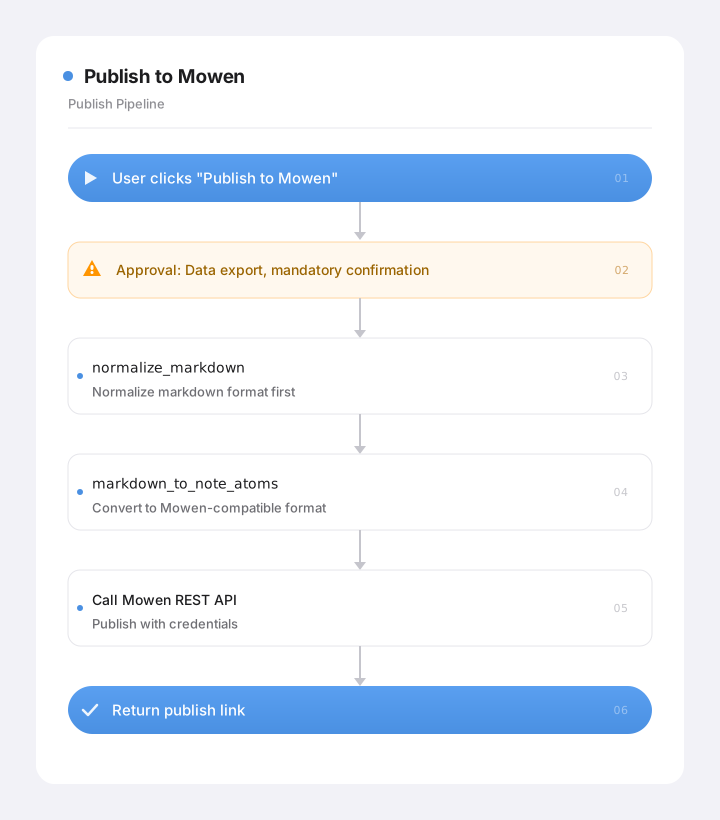
Since publishing is data leaving the app — irreversible, and touching privacy — I added an approval step into the flow that requires an explicit user nod. As for actually integrating with Mowen, even with a solid OpenAPI spec to work from, there were still plenty of gotchas along the way.
🔧 Gotcha · "it's just an API call," and then it wasn't
"API call" makes it sound easy, and it usually isn't — a lot of the real detail only shows up once you're actually building it. That's part of the tradeoff too: going through MCP/CLI is more of a black box, but it genuinely saves you from a lot of this.
The contract has to be followed exactly. Mowen only accepts a limited subset of Markdown (which is exactly why
markdown_to_note_atomsexists) — the publish endpoint, the edit endpoint, how images get sent, every field and rule has to match its OpenAPI contract precisely; guessing gets you a broken request. Once I had it working, I wrote its contract up as its own standalone reference doc, so the knowledge stuck around.It's not just "publish" — it also has to "update." If a user edits their draft after it's already been published, that update needs to sync into the already-published note, not create a duplicate. Just getting image captions to embed correctly took 10+ rounds of back-and-forth.
You have to rate-limit yourself. Mowen enforces call-frequency limits, and tripping them risks getting throttled or banned. So I built a rate limiter into the client that caps calls at one per second, queuing anything over that automatically — better slow and controlled than fast and banned.
Errors have to be sanitized. The raw 4xx/5xx errors Mowen returns can't be shown to the user as-is (unreadable, and possibly leaking technical detail). So they all get translated into plain language ("publish failed, please try again shortly," that kind of thing), with the raw error only landing in backend logs. And one hard line: Mowen's API key never enters the model's context, never gets logged, and never shows up in any metrics — it's pulled from a secure location only at the exact moment a request actually fires.
The complexity of "integrating with an external platform" was never in the API call itself — it's in the contract, incremental sync, rate limiting, credentials, and sanitization — everything that lives outside the call. Calling directly instead of going through MCP/CLI just means all of that lands on you. Worth being clear-eyed about that before you start.
Image embedding deserves its own expansion — it's a vivid illustration of exactly what "call it directly and you own everything" actually means in practice.
📐 Going deeper · "just drop an image into the note" turned into three separate hurdles
I originally assumed that if the text could already publish, an image was just "one more file to send." In practice, it took clearing three separate hurdles before I could get a single image correctly embedded in a Mowen note.
Hurdle one: a default request header turned image uploads into a 405. Images have to be uploaded to object storage (OSS) first. But my HTTP client, for convenience when sending JSON, had a global default header announcing "this is JSON." That header got inherited by the image upload request too, and the storage service misread the request as something else entirely, returning a flat 405 (method not allowed) — leaving a blank line where the image should've been. The fix was simple once found: drop that global default header, and let the client infer content type from what's actually being sent, request by request.
Hurdle two: the address Mowen returned had a stray backtick baked into it. Before uploading, you have to ask Mowen where to upload to. The address string it returned had a backtick character (
`) embedded inside it — and parsing that directly as a URL just breaks. No way around it — had to write a cleanup pass to strip it out myself. This is really universal across integrating with any external platform: whatever data actually comes back is the real spec, and adapting to it on your own side is just the cost of doing business.Hurdle three, and the most subtle: an image node has to sit at the document's absolute top level. Mowen's content structure has a rule: an image node must be a direct top-level child of the document. My original format converter, without thinking about it, had been nesting images inside paragraphs. The strange part: the upload genuinely succeeded (the storage side returned 200), but the Mowen app just showed a blank line no matter what. It took a while to track down that the upload wasn't the problem — the node was just sitting in the wrong place. The fix: have the converter "lift" images out of their paragraph and flatten them to the top level.
All three hurdles point at the same lesson from this post: what actually eats your time integrating with a platform is never the API call itself — it's everything around it that never made it into the docs: request headers, data formats, node positions, and so on. There's no free lunch. If you want to skip paying tokens, you pay in engineering effort instead.
⚖️ Where This Gets Vertical: Generic Is "an All-Purpose Bash and Free Rein," Vertical Is "Locking Things Down, One Tool at a Time"
Back to the comparison running through this whole series:
⚖️ The tradeoff · equipping an agent with tools, generic vs. vertical
A generic agent SmartWriter Why designed this way Deterministic work Often leans toward "give it an all-purpose Bash, let the model figure it out" Locked down piece by piece into deterministic operations (custom tool or backend function) More accurate, cheaper, more controllable — and no need to keep Bash around External integration Uses MCP/CLI to reach for outside resources Calls REST directly for deterministic scenarios; MCP only for genuinely complex capabilities Fewer dependencies is better for a desktop app Structured conclusions Stuffed into a tool's return value Routed through a separate schema-backed query Protects the boundary between the two paths
Building tools yourself, in a vertical business context, has a side benefit too. Once you've locked deterministic work down into individual, purpose-built tools, you've also eliminated the need for an "all-purpose Bash" — and that shrinks the entire agent's attack surface dramatically. An agent with a small, narrowly-scoped toolset (read-only, or limited to editing its own files) is a lot safer than one holding a general-purpose shell in its hand.
Exactly how "tools" and "safety" connect is the subject of the next post. Give the agent a whole toolbox, and the next question follows immediately: which of these tools can it use freely, and which absolutely need my sign-off first? And why should something like publishing — data leaving the app — require an explicit confirmation dialog?
Next post, we take apart permissions — how a "six-step evaluation" frames every single tool call, and why the master-key Bash tool got deleted entirely. Let's keep going.